Touchpoints
Touchpoint microflows are microflows that are called from touchpoints (pages, scheduled events, published API’s etc) and are responsible for calling business logic encapsulated in the orchestration microflows and for executing the next navigation event like closing, opening and refreshing pages.
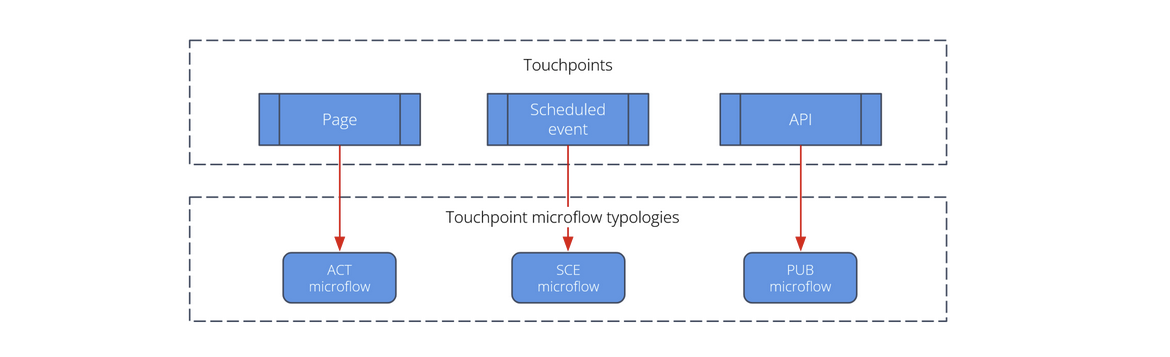
Reusing Touchpoint microflows is unusual and usually indicates misuse. So it's recommended to include the name of the touchpoint (such as a page or snippet) in the name of the corresponding touchpoint microflow, and to place the microflow in the same folder as the touchpoint itself. This makes it easier to locate microflows related to a specific touchpoint and helps prevent unintended reuse.
The synchronization of the Widget state on a page with data from the Client Cache depends on several factors. Like if the widget is a list or if the widget is dependent of another widget.
Therefore it is highly recommended to let the touchpoint microflow refresh the page parameter objects in order to get a full page refresh. For performance reasons this page refresh should not be implemented in orchestration or unit microflow typologies. Partial refresh is possible but understanding of the refresh mechanisms and factors of Mendix is then crucial.
1. Touchpoint microflow pattern
A touchpoint microflow has the following pattern:
- checking if the event from the interface should be handled or not (preconditions)
- calling process logic microflow(s) and unit microflow(s)
- calling the commit logic (optional)
- determining the next navigation action based on the output of the App logic (optional, only for pages)
2. Base microflow types
The Mendix best practices defines a wide range of microflow types mostly identifing the event that triggers them. Each type is defined by a letter code like OEN (On enter event) and DS (datasource). In practice, however, this detailing of the touchpoint microflows is rarely necessary as most Touchpoints involve only a limited number of microflows.
However, this approach is not implemented in the Testability Framework. The naming convention of the Testability Framework is first naming the microflows after its purpose and sometimes add subtyping to clarify it’s triggering.
For this reason, the number of base microflow types is generally limited to three:
- Action (
ACT): Handles an action on a page, such as a button click, datasource or page element event. - Scheduled event (
SCE): Handles the scheduled event trigger. - Published API (
PUB):Handles an incoming message from a published web-service, ODATA service, REST call etc.
Sub-typing can be applied when finer granularity is needed, such as identifying the exact trigger of a Touchpoint microflow. For example, ACT_OEN indicates an action microflow triggered by an On Enter page event. Sub-typing allows tracing of triggers without over-complicating the architecture.
3. Naming conventions
See section Naming conventions.
4. Call hierarchy of microflow typologies
Touchpoint microflows are allowed to call:
- the microflow typologies that belong to the Orchestration microflow typology.
- the microflow typologies that belong to the Unit microflow typology
See the Microflow call hierarchy overview for a schematic overview of which microflow typologies are allowed to call each other.