Units
A Unit microflow is a microflow that results in a measurable output. This output must be quantifiable, such as an object or attribute change, a created value (like a string or number), a retrieved list of data, or a validation result.
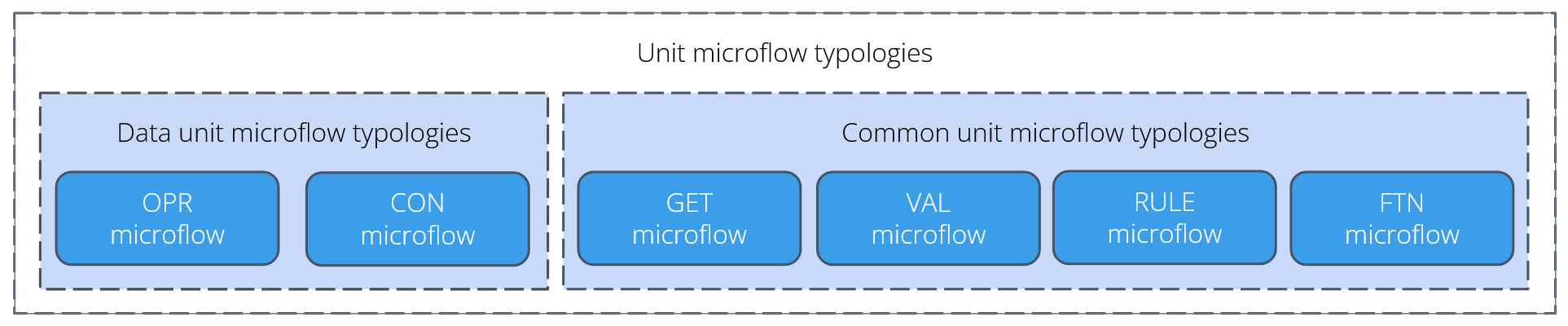
The unit microflow typologies are separated into two main groups:
- Data unit: These are unit microflows that are allowed to change or modify objects
- Common unit: These are unit microflows that retrieve data, calculate values, or validate objects, but are not allowed to change objects themselves.
The reason for this grouping is structural: data-mutating microflows are not allowed to be called by the dedicated Commit Microflow Typology (CMT). This restriction prevents objects from being changed during the final commit phase, which is dedicated to validation and saving.
1. Unit microflow pattern
A unit microflow must follow a strict pattern focused on simplicity and isolation. The two core elements of this pattern are:
- Checking pre-conditions
- Executing logic
Preconditions check whether the microflow should run based on the injected data, but the microflow should not contain decision logic that evaluates data to decide which action to take.
2. Base microflow types
2.1 Data unit microflow types
These units are responsible for controlled object manipulation:
- Operator (
OPR): These microflows perform operations that create, change, or flag objects for deletion in a controlled way. Note on Deletion: An operator to 'delete' an object usually means 'flagging for delete,' as the final physical delete action is executed by the Commit Microflow (CMT); - Consumed API (
CON): These microflows handle calls made to external web or REST services.
2.2 Common unit microflow types
These units provide utility, retrieval, or validation services without changing any data objects:
- Getter (
GET): Used to retrieve, filter, sort, and join data, either from the database or from memory. Complex database lookups, in particular, should be separated into a dedicated GET unit; - Function (
FTN): Used to calculate or determine a specific literal value (like a string or integer) or to manipulate the content of a list of objects, but never to change an object. Preferably, a function that manipulates a literal value should only have simple (primitive) input parameters to guarantee that objects are not manipulated; - Validation(
VAL): Used to evaluate the correctness of data against business rules. This typology is central to enforcing Invariant Rules that guarantee data integrity; - Rule (
RULE): Similar to Mendix's built-in rule, this microflow executes a complex evaluation, resulting in a simple Boolean or Enumeration value.
3. Naming conventions
For details on how microflows are named based on their purpose, refer to the section on Naming conventions.
4. Call hierarchy of microflow typologies
The Call Hierarchy defines which microflow types are allowed to call each other, ensuring the structural integrity of the application.
All Data unit microflows (OPR, CON) are allowed to be called from:
- the Touchpoint microflow typologies. However, it is recommended that Touchpoint microflows use Orchestration microflows to execute Unit microflow typologies.
- the Orchestration microflow typologies.
All Common unit microflows (GET, FTN, VAL, RULE) are allowed to be called from:
- all Touchpoint microflow typologies (
ACT,SCE,PUB) - the
ORCmicroflow typologies
Specifically GET and FTN microflows are allowed to be ‘nested' (called by other unit microflows of the same type).
Be cautious when nesting unit microflows. Every nested call will quickly multiply the number of edge cases that must be tested, making deeply nested units quickly untestable. Testing for boundary values and edge cases is crucial for robust unit testing.
For a complete structural overview of all allowed calls, consult the Microflow call hierarchy overview.