The TestLogger Helper Component
The TestLogger Component provides a "process assurance" layer by verifying that business logic is executed in the correct sequence. While standard testing only confirms the final result, TestLogger captures the internal execution footprint to detect "silent failures", cases where a process finishes successfully but skips critical internal steps like compliance or tax checks.
This transparency significantly reduces Root Cause Analysis (RCA) time by providing a precise breadcrumb trail directly to the logic deviation. It acts as a safety net during large-scale refactoring, allowing developers to restructure code while ensuring the underlying unit-layer behavior remains unchanged.
By asserting against a baseline "test path," you move from black-box testing to full logic traceability. This delivers valuable proof that specific validation microflows were actually triggered. Ultimately, TestLogger increases release velocity by giving teams the confidence that complex transactions are following intended business rules. It turns invisible logic into a verifiable asset, protecting the integrity of your Mendix application as it scales.
Interested users can contact info@menditect.com for early access to this component before its official Marketplace release.
1. Data capturing mechanisms
The TestLogger records the executed sequence of microflow names and custom tags called the "test path". When combined with an MTA assertion, containing the expected test path, this utility supports the automated integration- and regression testing of your Mendix app.
1.1. Collected context and tags
To record a test path, developers insert a Probe (via the ORC_tlog_set_testpath microflow) at key logic points. Each probe is highly configurable, allowing you to capture the specific context of an execution step:
- Execution Context (Callstack Offset): Automatically records the name of the microflow at a specific stack depth:
- offset 0: current microflow
- offset 1: parent microflow
- offset > than the total hierarchy depth: top level microflow (typically set to 99).
- Contextual Tags: Appends custom strings to the path, enabling the logging of dynamic business data (e.g., "Customer Type: Gold").
Probes are context-aware and only capture test paths during MTA-driven execution. They remain inactive during standard production runtime to ensure zero impact on system performance.
1.2. Smart Deduplication & Tag Merging
To maintain a clean and readable TestPath, the probe applies the following deduplication logic:
- Duplicate Suppression: If the microflow name and tag value are identical to the previous entry, the probe ignores the repetition.
- Tag Merging: If a probe records a new tag for the same microflow name as the previous entry, the new tag is appended to that existing line rather than creating a new row.
Calling the probe twice within the microflow CrmModule.GET_customer_by_id without tags results in a single entry:
CrmModule.GET_customer_by_id
Calling the probe twice within the microflow SalesModule.OPR_order_create_by_customer with the tag gold results in a single entry:
SalesModule.OPR_order_create_by_customer, gold
If the probe is called twice within the microflow SalesModule.OPR_order_create_by_customer, first with tag gold and then with tag 9383results in a single line containing the microflow name and both tags:
SalesModule.OPR_order_create_by_customer, gold, 9383
1.3. Selective Path Recording (Logging boundaries)
In complex applications, a single transaction may trigger a vast hierarchy of microflows. The LoggingBoundary allows you to isolate a specific sub-hierarchy for recording. Without this feature, developers would be forced to trigger sub-processes individually within MTA to avoid capturing irrelevant data. With a boundary set, you can initiate a single high-level test case while capturing only the logic that matters for your specific regression test.
Scenario: A high-level microflow (e.g., ACT_olne_newedit_save) executes a long sequence of events. You only want to verify the internal logic of the ORC_olne_set_quantity_and_amount branch (marked red) and its descendants, ignoring all other sub-microflows.
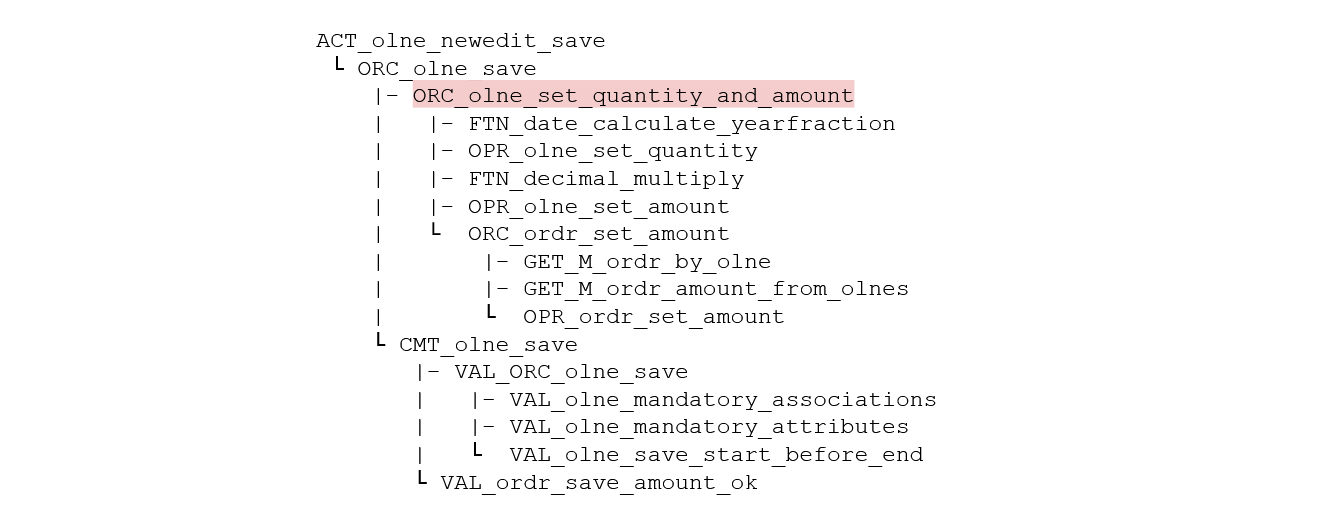
The Solution: Provide the fully qualified name (OrderModule.ORC_ordr_set_quantity_and_amount) to the LoggingBoundary parameter of the ORC_tlog_start microflow.
Resulting Behavior: The ORC_tlog_set_testpath probe becomes context-aware. It will only record entries if the boundary microflow is present in the active callstack. Any probes encountered in other branches of the parent process (e.g. CMT_olne_save and its decendants) will be ignored, resulting in a clean, focused test path.
2. Implementation of the TestLogger in your Mendix Model
The TestLogger follows a three-step implementation process:
- Configure: Import the TestLogger module into your project
- Initialize (Optional): In case MTA is used for front-end testing, add the initializing microflow
ORC_tlog_startto your touchpoints (ACTmicroflows). If MTA is used for back-end testing, call the initialization microflow from MTA. - Add Probes:
- Insert the TestLogger probe (a call to
ORC_tlog_set_testpath) into any microflow that needs tracking. - Set the ‘callstackOffset’ and ‘tag’ parameter in order to append the microflow name and/or tag information to the
TestPathattribute. For more information see the ReadMe or the in-microflow documentation.
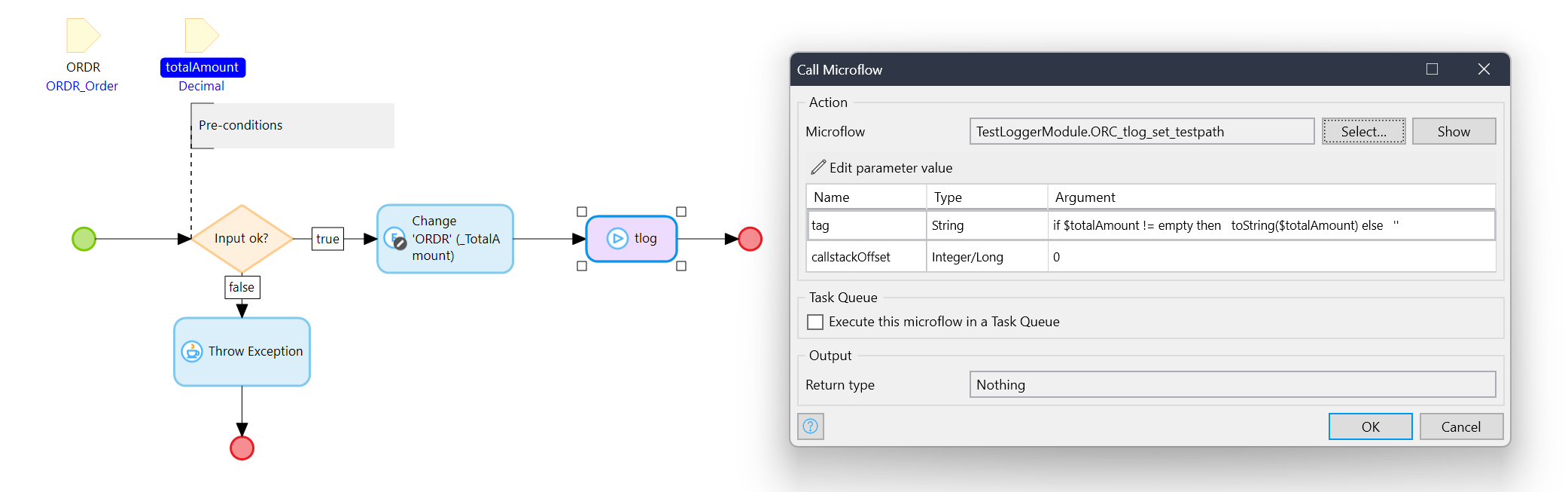
Place the TestLogger probes within the Unit microflows (the lowest layer of data manipulation) rather than the Orchestration microflows.
This placement ensures that restructuring the process layer will not invalidate the recorded test paths. By logging the fundamental units of work, your recorded test path remains a stable footprint of the application's core logic, preserving the integrity of your regression tests.
3. Configure a Test Case in MTA
3.1. Create an Integration Test Case
See for details http://documentation.menditect.com.
3.2. Initialize the TestLogger
- Add a call to the microflow
ORC_tlog_startat the start of your test case. This will create an TLOG object that is associated to the user session and will contain the executed test path. - Optionally, give the microflow parameter
loggingBoundarythe name of a microflow to narrow the collected test path to a part of the microflow hierarchy.
3.3. Add an Assert in Mendix Test Automation (MTA)
The recorded TestPath attribute provides a powerful baseline for regression testing. After executing a test run, review the recorded TestPath. If the path is correct, add it as an assertion in MTA (see http://documentation.menditect.com for more information about assertions).
In subsequent test runs, MTA will verify that the footprint of the application's internal business logic has not changed. If a developer unknowingly alters the execution sequence, the test will fail, asserting that the application's underlying behavior has been destabilized.
The following output is an example of the format of the testpath containing a hierarchy of four microflows, where the last microflow also registers two key values:
CrmModule.GET_customer_by_id
SalesModule.GET_order_latest
SalesModule.FTN_order_create_unique_number
SalesModule.OPR_order_create_by_customer, gold, 8393