Integration Testing
The Integration Test is part of the middle layer of the Testing Pyramid. Integration testing (also known as orchestration testing) verifies that microflows are executed in the correct sequence. This sequence is determined by the decision activities within the orchestration microflows. The purpose of this test is to validate that the composition of microflows works as intended, focusing on the flow and decisions rather than the individual data results of each unit.
1. Creating an integration test
An integration test is typically created through analysis, following these steps:
- Identify orchestration paths
- Determine edge cases for each path
- Analyze how unit results affect the orchestration path
- Add logging to microflows
- Define the expected output
- Add test to Menditect Test Automation (MTA)
1.1. Identify orchestration paths
When identifying relevant paths within a microflow hierarchy, focus your testing on the basis paths - the smallest set of independent and unique routes through the orchestration. This approach ensures you test the essential control-flow behavior without attempting to test every possible branch combination.
This aligns with McCabe's 'simplified baseline method' *(*paragraph 6.3 on page 42), which defines the minimum number of linearly independent paths required to achieve structural coverage. By targeting these basis paths, testers can confirm that the orchestration behaves correctly under all major logical conditions, while keeping the test set both manageable and meaningful.
Remember that an "applicability precondition" - a check to see if the logic is even relevant - may prevent a microflow from executing at all. This condition directly influences which basis paths must be included in your test set.
1.2. Identify edge cases per path
The path taken in an orchestration is based on the conditions that are checked in the decision activities. You must examine the decisions to find the parameters and boundaries that dictate the flow. If this evaluation reveals complex structures (e.g., complicated if-then-else statements using "or" and "and"), it is recommended to replace that logic with a dedicated Mendix Rule that can be tested separately.
Determining all the boundary values and including them in the data variations is similar to the process of finding edge cases in unit testing.
1.3. Analyze the influence of unit results on the orchestration path
Orchestration microflows execute units, and these units may create, modify, or change data. If data manipulated by one unit is then used in a subsequent decision, the path executed by the orchestration depends on the unit's output.
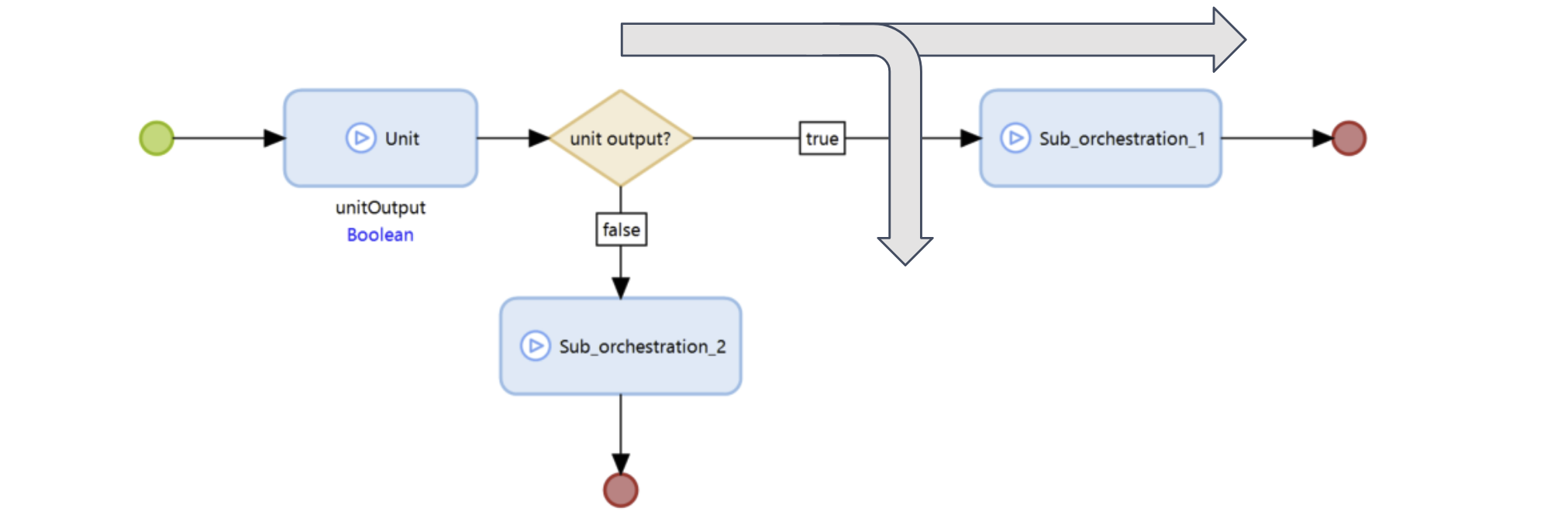
This scenario is comparable to using "implicit" parameters in unit testing. You must analyze these dependencies and use data variations or database manipulation within your test case to ensure the unit returns the expected results needed to traverse the desired path.
1.4. Add logging to microflows
To generate measurable test results, it is necessary to log which microflows are executed. As a best practice, you should place these probes in the Unit microflows rather than in Orchestration microflows. This ensures that restructuring the process layer does not break existing recorded test paths.
Menditect provides the Menditect TestLogger, a module that contains a probe microflow and a non-persistent entity called TestLog. You can insert this probe into any microflow. Each time the probe is executed, it records the name of the microflow and appends it to the TestPath attribute of the corresponding TestLog object. If the number of potential test paths becomes too large, you may choose to log only a selected set of key units by specifying the LoggingBoundary.
1.5. Define the output
After the test executes, the log contains the names of all microflows executed in sequence. This sequence can serve as the expected result (assertion) in your test tool. Manually creating this assertion is tedious and error-prone, so use the following workflow instead:
- Define the integration test without an assert.
- Run the test.
- Retrieve the executed test path from the log.
- Verify that the test path is correct (it is human-readable).
- Copy the test path from the log and paste it into the assertion.
1.6. Configure the integration test using the TestLogger module
Read the page The TestLogger Helper Component for details.
2. Orchestration Test Example
Consider an order line for a service product. The order line quantity is determined by the length of the delivered service in years. So, a service period of 6 months results in a quantity of 0,5 year.
Setting the order line quantity on the OrderLine object is an orchestration that has two steps:
FTN_date_calculate_yearfraction: a function to calculate the year fraction.OPR_olne_set_quantity: an operator to change the quantity on the OrderLine object.
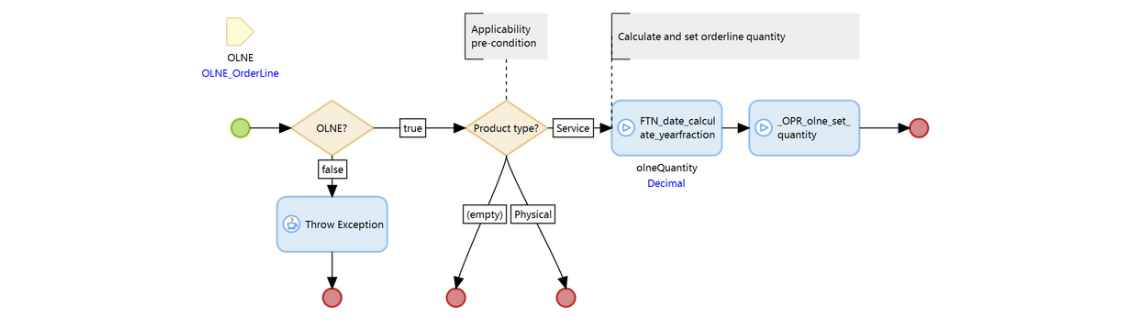
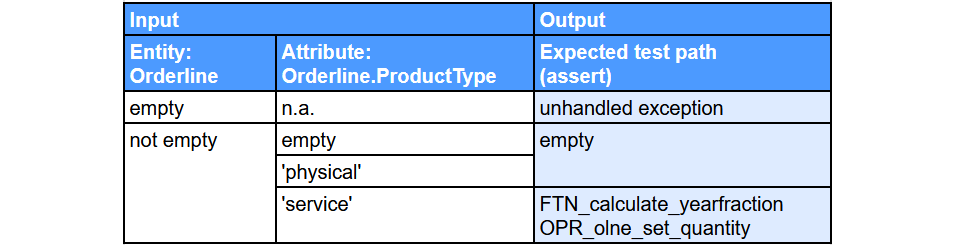
Analysis of the orchestration's decision activities indicates that the edge cases depend on the OrderLine entity and the OrderLine.ProductType attribute. The 'truth table' that defines the expected orchestration path result is depicted below: