Touchpoint Layer
The Touchpoint Layer contains all the external interfaces of your application or module and their associated logic. We call it a "touchpoint" layer, not an "interface" layer, to avoid confusion since every architectural layer has its own interfaces (e.g., published microflows) for communication.
1. Touchpoints and Their Purpose
A touchpoint refers to any point where an external system, user, or scheduled event interacts with your application. These are incoming events that originate outside the system and must be handled by the application.
It’s important to distinguish how APIs fit into this model. APIs belong to the touchpoint layer only when they are exposed by your application and called by an external party—for example, a REST API that receives data from a third-party system. In this case, the interaction is initiated externally and is therefore considered a touchpoint.
On the other hand, APIs that your application calls to interact with external systems—such as sending a request to an external service—are considered part of the domain layer. These represent internal triggers that initiate communication with the outside world, and are driven by business logic within your application rather than an external request.
The Touchpoint Layer's primary purpose is to receive these events, prepare the necessary data, and pass control to the Application Layer for processing.
In a typical Mendix application, we can distinguish between a few primary touchpoints:
- Pages & Snippets: User-facing interfaces for displaying data and receiving user input.
- Published APIs: Endpoints that allow other applications to interact with your Mendix app.
- Scheduled Events: Time-based triggers that initiate processes.
2. Microflow typologies in the Touchpoint layer
The Touchpoint layer contains microflows that are triggered by a user action, an external API call, or a scheduled event. These microflows should be kept as thin as possible, handling only logic directly related to the touchpoint.
A key best practice is to design these microflows to be private to their specific touchpoint, hiding their implementation from the rest of the application.

For more details on microflow typologies and their naming conventions, see the Touchpoint microflow typologies page.
3. Why Touchpoint microflows are not shared
We strongly advise against sharing microflows across multiple touchpoints. Even if two different pages seem to require the same logic (e.g., pre-conditions or navigation), sharing a single microflow will complicate your application in the long run.
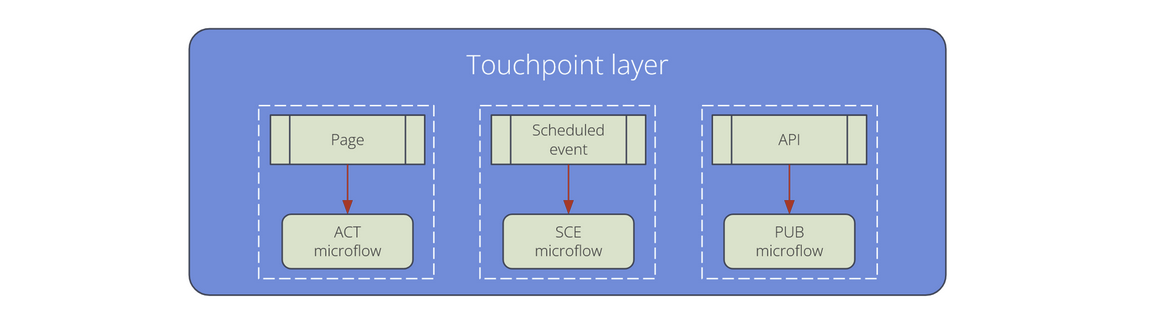
Keeping touchpoint microflows and their corresponding pages or snippets in the same module and folder ensures a clear, one-to-one relationship. This practice makes it much easier to adapt or completely remove a touchpoint without affecting other parts of your application.
Mind: even snippets do have their own non-shared touchpoint microflows.